

Paid ads stop the moment your budget does. Organic traffic
does not. A product page that ranks well can bring in shoppers for months or
years without costing you a cent per click. That is why e-commerce SEO
is one of the most valuable skills for anyone running an online store.
The challenge is that online stores face SEO problems that
blogs and service sites rarely do: thousands of near-identical product pages,
filters that create endless URL variations, and products that go out of stock
overnight. This guide walks through what actually moves the needle, in the
order that makes sense for most stores.
What Is E-Commerce SEO?
Quick answer: E-commerce SEO is the process of
optimizing an online store so its category pages, product pages, and content
appear higher in search results for terms shoppers use. The goal is to attract
free, targeted visitors who are ready to browse or buy, rather than relying
only on paid advertising.
In practice, it combines three areas of work:
- Technical
SEO: making sure search engines can crawl, understand, and index your
store.
- On-page
SEO: writing and structuring pages so they match what shoppers are
searching for.
- Off-page
and content SEO: earning links and mentions, and publishing helpful
content that supports your products.
Unlike a typical blog, your most valuable pages are the ones
that sell. That shapes every decision below.
Start With Keyword Research That Reflects Buying Behavior
Not all search terms are equal. Someone searching “how to
choose running shoes” is learning. Someone searching “women’s trail running
shoes waterproof” is much closer to buying.
Match Keywords to the Right Page Type
A simple rule keeps your site organized: each page type
targets a different kind of search.
|
Page Type |
Typical Search Intent |
Example Keyword |
|
Homepage |
Brand or broad navigational |
“your brand name” |
|
Category page |
Commercial, browsing |
“waterproof hiking boots” |
|
Product page |
Transactional, specific |
“[brand] [model] hiking boots size 9” |
|
Blog or guide |
Informational |
“how to break in hiking boots” |
Category pages often deserve the most attention. They target
broader, higher-volume searches and tend to be the best entry point for new
shoppers.
Where to Find Keyword Ideas
You do not need expensive tools to begin. Useful free or
low-cost sources include:
- Google’s
autocomplete and “People also ask” boxes, which show real phrasing.
- Google
Search Console, which reveals queries your store already appears for.
- Your
own site search data, which shows what visitors expect to find.
- Customer
questions from emails, reviews, and support chats.
Key Point: Avoid targeting the same keyword on
several pages. When two of your pages compete for one phrase, neither performs
as well as a single, strong page would.
Build a Site Structure Search Engines Can Follow
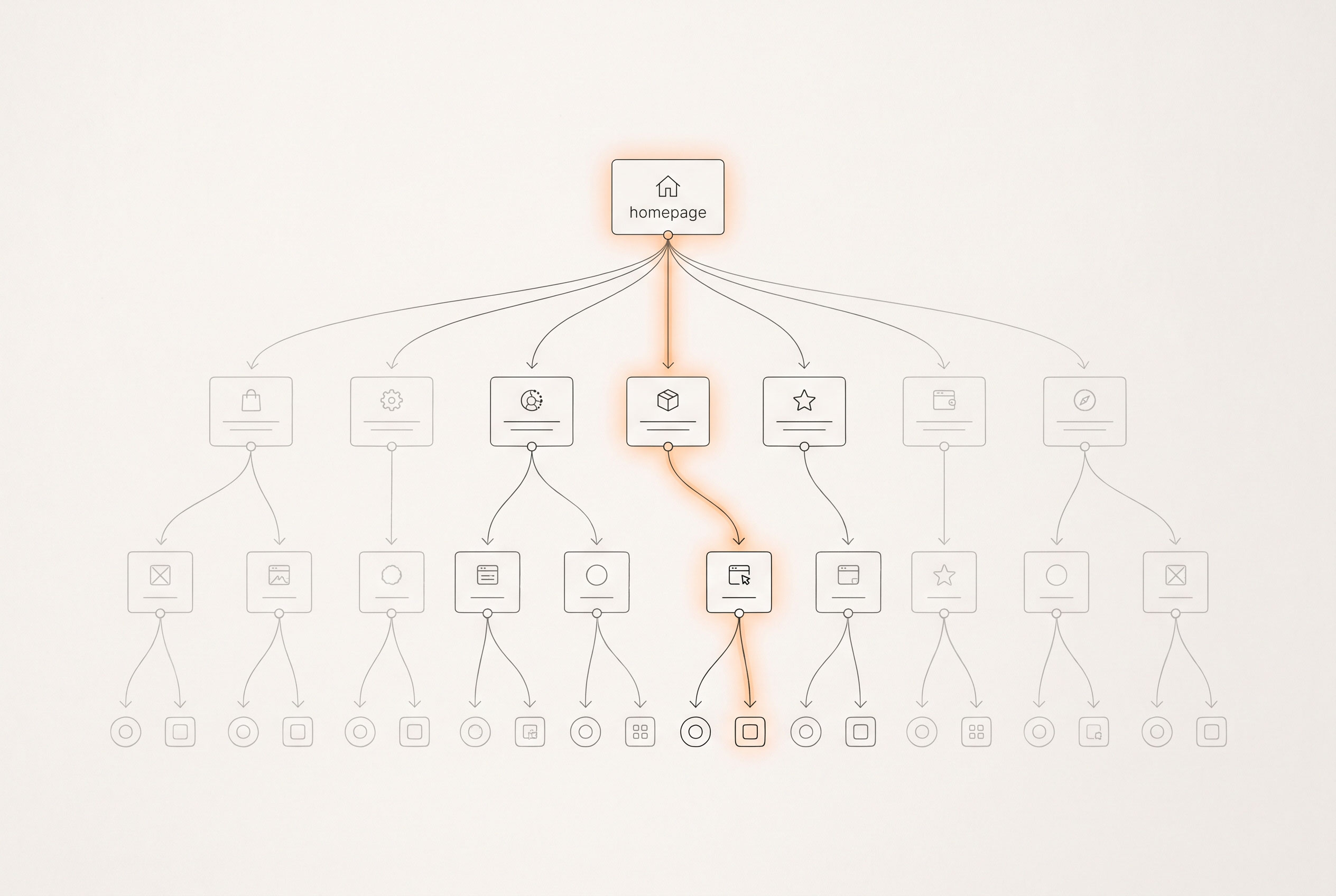
A clean structure helps shoppers and search engines find
everything quickly. A good rule of thumb is that important pages should be
reachable within three clicks from the homepage.
A logical hierarchy usually looks like this:
- Homepage
- Category
(e.g., Men’s Jackets)
- Subcategory
(e.g., Rain Jackets)
- Product
pages
Use short, readable URLs such as /mens-jackets/rain-jackets/
rather than long strings of numbers and parameters. Add breadcrumb
navigation so visitors can step back easily, and so search engines understand
how pages relate.
Link Internally With Purpose
Internal links pass authority between pages and guide
shoppers toward products. Link from guides to relevant categories, from
categories to best sellers, and from product pages to related items. Use descriptive
anchor text instead of “click here.”
Fix the Technical Problems Unique to Online Stores
Technical issues quietly limit many stores. These are the
ones worth checking first.
Faceted Navigation and Duplicate Content
Filters for size, color, and price are great for shoppers,
but they can generate thousands of URLs showing nearly the same products.
Decide which filtered pages deserve to rank (for example, “black leather
sofas”) and keep the rest out of the index with canonical tags or noindex rules.
Out-of-Stock and Discontinued Products
What you do here depends on the situation:
- Temporarily
out of stock: keep the page live, show the status clearly, and offer
alternatives or a back-in-stock notification.
- Permanently
discontinued with a close replacement: use a 301 redirect to the
replacement.
- Permanently
discontinued with no replacement: redirect to the relevant category or
return a proper “gone” status.
Speed, Mobile Experience, and Indexing
Shoppers abandon slow pages, and Google measures page experience
through its Core Web Vitals. Compress images, use modern formats such as WebP,
and limit heavy scripts. Also confirm that your XML sitemap lists only pages
you want indexed, and review the Pages report in Google Search Console for
errors.
Optimize Product and Category Pages
These pages earn the revenue, so give them real attention.
Product Pages
- Write
unique descriptions. Manufacturer text is used by every competitor.
Describe who the product suits, what problem it solves, and how it differs
from similar items.
- Use
clear titles. Put the product name and one or two key attributes up
front, such as “Merino Wool Hiking Socks – Cushioned, Mid-Calf.”
- Add
quality images with descriptive file names and alt text.
- Show
reviews. They add fresh, relevant text and help shoppers decide.
- Add
product structured data. Product schema markup helps search engines
understand price, availability, and ratings, and can make you eligible for
rich results.
Category Pages
Category pages often carry thin content. Add a short, useful
introduction above or below the products, answering what the category includes
and how to choose within it. Keep it helpful rather than stuffed with keywords.
Link to subcategories and relevant guides.
Key Point: Search engines cannot reward a page that
gives them nothing to read. A product grid with no text, headings, or context
is a missed opportunity.
Use Content to Capture Shoppers Earlier
Many buyers research before they choose a store. Content
lets you meet them at that stage.
Useful formats for online stores include:
- Buying
guides, such as “How to Choose a Standing Desk.”
- Comparison
articles, such as “Cast Iron vs. Stainless Steel Pans.”
- How-to
and care guides, which build trust and attract links.
- Size,
fit, or compatibility explainers that reduce returns.
Each guide should link to the relevant category or product
pages. This turns informational visits into shopping sessions.
Earn Links and Build Trust
Search engines treat links from reputable sites as a signal
of credibility. For stores, realistic approaches include:
- Creating
genuinely useful resources, such as size charts or calculators, that
others want to reference.
- Sending
products to relevant reviewers or creators and asking for honest coverage.
- Getting
listed in trusted industry directories and supplier pages.
- Making
sure existing brand mentions link back to your site.
Avoid buying links or joining link schemes. They carry real
risk and rarely pay off.
Measure What Is Working

Set up Google Search Console and Google Analytics
early. Track:
- Impressions
and clicks for category and product pages
- Organic
sessions and conversion rate
- Pages
that rank on page two, which are often the quickest wins
- Indexing
errors and crawl issues
SEO takes time. Many stores wait several months before
seeing clear results, and the timeline depends on competition, site age, and
how much work you put in.
A Simple Order of Operations
If the list above feels overwhelming, work through it in
this sequence:
- Fix
major technical and indexing problems.
- Research
keywords and assign one main target per page.
- Improve
your top category pages first, then best-selling products.
- Add
structured data and improve page speed.
- Publish
guides that support your main categories.
- Build
links steadily and review your data monthly.
The Takeaway
Growing organic traffic for an online store comes down to
making your site easy to crawl, matching each page to a clear search intent,
and giving shoppers more useful information than your competitors do. You do
not need to do everything at once. Start with the pages that matter most to
revenue, improve them properly, and keep measuring. Steady, consistent work
tends to outperform one big push.