

Opening an
online store looks simple from the outside — pick a platform, upload some
products, and wait for orders to arrive. In practice, the stores that actually
succeed are built on a series of deliberate decisions: the right platform, a
design that earns trust, a checkout that doesn't lose customers, and a plan for
getting traffic in the first place.
This guide
walks through the practical steps of building an e-commerce website that can
genuinely compete, whether you're launching your first store or rebuilding one
that isn't performing.
What
Makes an E-Commerce Website "Successful"?
Before
diving into tools and platforms, it helps to define the goal. A successful
e-commerce website isn't just one that looks good — it's one that converts
visitors into paying customers reliably while being sustainable to run.
A few
markers of a well-built store:
- Pages load quickly on both
desktop and mobile
- The checkout process is short
and frictionless
- Product information answers real
customer questions
- The site builds trust through
design, reviews, and clear policies
- The store is structured in a way
search engines can understand
Keeping
these markers in mind will help you evaluate every decision that follows.
Step 1:
Choose the Right E-Commerce Platform
Your
platform choice affects everything from design flexibility to long-term costs,
so it deserves real consideration rather than a quick default.
Popular
Options Compared
|
Platform |
Best
For |
Ease
of Use |
Cost
Structure |
|
Shopify |
Beginners
and growing brands |
High |
Monthly
subscription + transaction fees |
|
WooCommerce
(WordPress) |
Store
owners wanting full control |
Moderate |
Hosting +
free plugin, paid extensions |
|
BigCommerce |
Mid-size
to larger catalogs |
Moderate-High |
Monthly
subscription |
|
Squarespace |
Design-focused
small stores |
High |
Monthly
subscription |
Key
Point: There is no
single "best" platform — the right choice depends on your technical
comfort, budget, and how much customization you expect to need as you grow.
If you
already manage a WordPress site or want maximum control over hosting and code,
WooCommerce is a natural fit. If you'd rather avoid server management entirely,
a hosted solution like Shopify removes that burden in exchange for a recurring
fee.
Step 2:
Plan Your Site Structure Before Designing Anything
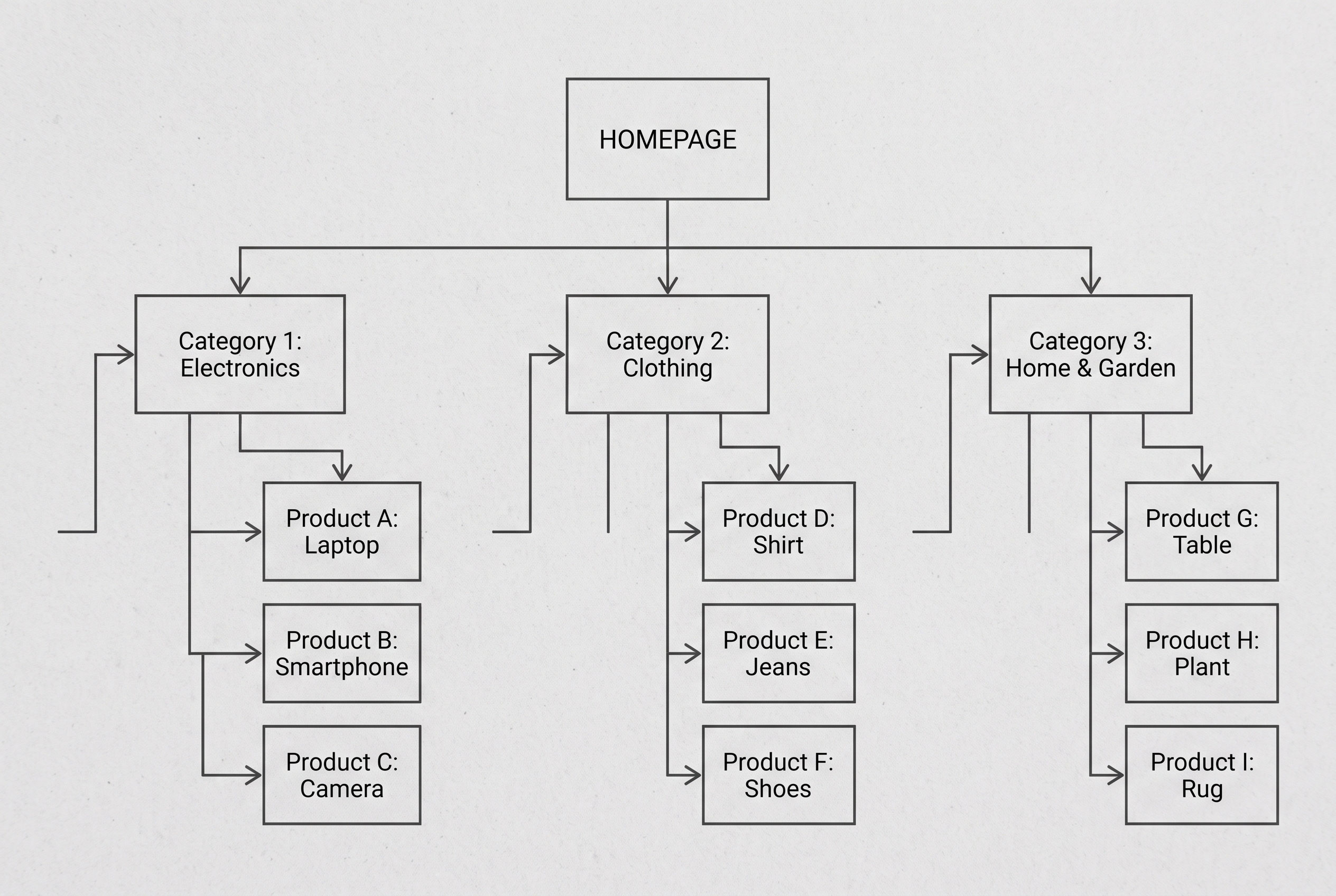
A common
mistake is jumping straight into themes and colors before deciding how the
store should be organized. Good structure makes the site easier to navigate for
shoppers and easier to index for search engines.
At a
minimum, plan for:
1.
A
clear homepage that directs visitors to key categories
2.
Logical
category and subcategory pages
3.
Individual
product pages with consistent formatting
4.
A
simple, visible navigation menu
5.
Essential
pages: About, Contact, Shipping, Returns, and Privacy Policy
Avoid
burying products under too many category layers. In most cases, a shopper
should be able to reach any product in three clicks or fewer from the
homepage.
Step 3:
Design for Trust and Usability
Design isn't
just about appearance — it directly affects whether visitors trust the store
enough to enter their payment details.
Design
Elements That Build Trust
- Professional, consistent
branding —
logo, color scheme, and fonts used consistently across pages
- High-quality product photography from multiple angles
- Visible contact information and a real return policy
- Customer reviews or testimonials, where available
- Security badges near the checkout, such as SSL
indicators
Mobile
Responsiveness Is Not Optional
A
significant share of online shopping now happens on phones. If your store is
difficult to browse or check out on a small screen, you will lose sales
regardless of how strong your product line is. Test every page — not just the
homepage — on a mobile device before launch.
Step 4:
Set Up a Smooth Checkout Process
The checkout
page is where many otherwise-promising stores lose customers. Cart abandonment
often comes down to friction: too many steps, unexpected costs, or a lack of
trusted payment options.
Practical
ways to reduce friction:
- Offer a guest checkout
option instead of forcing account creation
- Display shipping costs early,
not as a surprise at the final step
- Support multiple payment
methods, such as credit cards, digital wallets, and regionally popular
options
- Keep the checkout to as few
pages or steps as possible
- Show progress indicators so
customers know how many steps remain
Key
Point: Every extra
field or unnecessary step in checkout is a chance for a customer to abandon the
purchase. Simplicity here has a direct, measurable effect on sales.
Step 5:
Choose Reliable Payment and Shipping Options

Payment
gateways connect your store to the financial systems that process transactions.
Common choices include Stripe, PayPal, and platform-native options like Shopify
Payments. Compare transaction fees, supported currencies, and payout timelines
before committing to one.
For
shipping, decide early whether you'll offer:
- Flat-rate shipping
- Real-time carrier rates
calculated at checkout
- Free shipping built into product
pricing
Each
approach has trade-offs between simplicity and accuracy, and the right one
often depends on your product size, weight, and profit margins.
Step 6:
Optimize for Search Engines from the Start
Search
engine optimization (SEO) determines whether potential customers can find your
store without paid advertising. E-commerce SEO has some specific requirements
beyond a typical website.
Core
E-Commerce SEO Practices
- Write unique product
descriptions instead of copying manufacturer text
- Use descriptive, keyword-relevant
page titles and meta descriptions
- Optimize image file names and
alt text
- Ensure category pages have their
own descriptive content, not just product grids
- Fix or redirect broken links,
especially for discontinued products
Direct
Answer: E-commerce
SEO is the process of optimizing product pages, category pages, and site
structure so a store ranks higher in search results. It focuses on unique
content, fast load times, mobile usability, and clear navigation, all of which
help both search engines and shoppers find what they need.
Step 7:
Plan Your Marketing Strategy Before Launch
A well-built
website with no visitors won't generate sales. Marketing should be planned
alongside the build, not treated as an afterthought.
Common
channels for new e-commerce stores include:
- Email marketing for abandoned cart recovery and
repeat purchases
- Social media to showcase products and build
an audience
- Paid search or social ads to drive initial traffic
- Content marketing, such as blog posts related to
your products
- Influencer or affiliate
partnerships,
depending on your niche
Most
successful stores rely on a combination of these rather than a single channel,
since organic search traffic in particular takes time to build.
Step 8:
Test, Launch, and Monitor Performance
Before going
live, test the entire purchase flow as if you were a customer: browse a
product, add it to the cart, complete checkout, and confirm the order email
arrives correctly. Test on multiple browsers and devices.
After
launch, track key metrics such as:
|
Metric |
What
It Tells You |
|
Conversion
rate |
Percentage
of visitors who complete a purchase |
|
Cart
abandonment rate |
Where
customers drop off before finishing checkout |
|
Average
order value |
How much
customers spend per transaction |
|
Page load
speed |
Whether
technical issues are costing you sales |
|
Traffic
sources |
Which
marketing channels are actually working |
Reviewing
these regularly allows you to make informed adjustments rather than guessing at
what needs improvement.
Common
Challenges New Store Owners Face
- Underestimating shipping and
packaging costs,
which can quietly erode margins
- Choosing a platform that doesn't
scale with the
business as it grows
- Neglecting product photography, which is often the deciding
factor in a purchase decision
- Launching without a returns or
refund policy,
which reduces buyer confidence
- Ignoring mobile usability, despite mobile making up a
large share of traffic
Anticipating
these issues early can save significant time and money compared to fixing them
after launch.
Final
Takeaway
Building a
successful e-commerce website is less about finding one perfect tool and more
about getting a series of fundamentals right: a platform suited to your needs,
a structure that's easy to navigate, a checkout that removes friction, and a
plan for bringing in traffic. Stores that treat these as an interconnected
system — rather than isolated tasks — tend to perform far better than those
built piece by piece without a clear plan.