

A sitemap is a file or web page that lists the pages,
media files, or other resources of a website and describes how they relate to
one another. Sitemaps serve two audiences: search engines, which use
them to discover and crawl content, and human visitors, who use them to
navigate a site.
Note: “Sitemap” is used for two related but distinct
things. An XML sitemap is a machine-readable file for crawlers. An HTML
sitemap is a web page for people. The term is also used in web design for a
planning diagram of a site’s structure.
Quick answer: A sitemap is a list of a website’s
URLs, usually in XML format, that tells search engines which pages exist and,
optionally, when they were last updated. It does not guarantee that pages are
crawled or indexed, but it helps crawlers discover content, particularly on
large or newly launched sites.
|
Infobox |
|
|
Type |
Web file / web page / design document |
|
Common formats |
XML, HTML, plain text, RSS/Atom feeds |
|
Typical file name |
sitemap.xml |
|
Primary purpose |
Content discovery by crawlers; navigation for users |
|
Protocol introduced |
2005 (Google); jointly adopted 2006 |
|
Specification site |
sitemaps.org |
|
Related file |
robots.txt |
Overview
A sitemap acts as an inventory of a website. In its
search-engine form, it gives crawlers a direct list of URLs to consider, rather
than requiring them to find every page by following links. Crawlers still
discover pages through links, so a sitemap supplements normal crawling and does
not replace it.
Sitemaps are most useful in certain situations: sites with a
very large number of pages, sites with weak internal linking, new sites with
few external links, and sites with substantial rich media content. Small sites
with clear internal linking are generally able to be crawled fully without one.
The concept predates search engines. In web design and
information architecture, a “site map” has long referred to a diagram or
outline of a site’s pages, produced during planning and sometimes published as
a navigational aid.
History
Early websites often included a simple page of links to
major sections, which functioned as a manual table of contents. As sites grew,
these pages became a common navigation aid.
In June 2005, Google introduced the Sitemaps
protocol, initially under the name “Google Sitemaps,” as a way for webmasters
to submit lists of URLs. In November 2006, Google, Yahoo!,
and Microsoft announced joint support for the format, which was
published under a shared specification at sitemaps.org using a Creative
Commons license. In 2007, the three companies and Ask.com also announced
support for referencing sitemaps through the robots.txt file, a feature
commonly described as sitemap auto-discovery.
The protocol has remained largely stable since version 0.9,
with extensions added by individual search engines for specific content types.
Types of Sitemaps
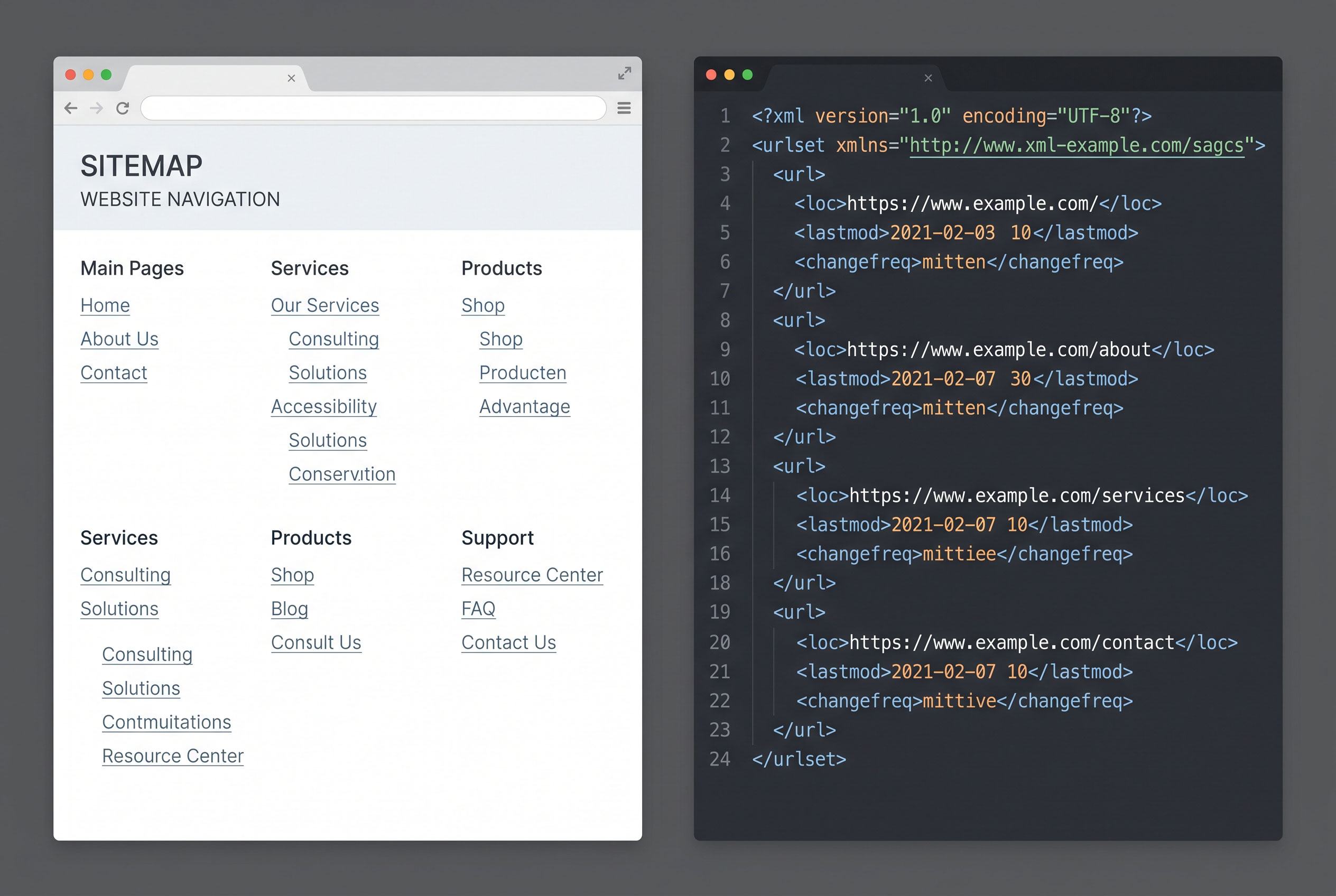
XML sitemaps
An XML sitemap is a file written in Extensible Markup
Language that follows the Sitemaps protocol. Each page is described in a <url>
element, which must contain a <loc> element giving the page’s full
address. Optional elements include <lastmod> (last modification date), <changefreq>
(expected change frequency), and <priority> (relative importance within the
site).
Search engines vary in how they treat the optional elements.
Google has stated publicly that it ignores <priority> and <changefreq>
and uses <lastmod> only when it is consistently accurate. Other search
engines may handle these values differently.
HTML sitemaps
An HTML sitemap is an ordinary web page that links to the
major sections or all pages of a site, usually organized by category. Its main
audience is human visitors, though crawlers can also follow its links. It is
typically linked from the site footer.
Text and feed-based sitemaps
The protocol also accepts a plain text file containing one
URL per line. Syndication feeds in RSS or Atom format can serve as sitemaps,
which suits blogs and news sites that publish frequently, although feeds often
list only recent items.
Specialized sitemaps
Extensions exist for specific content types. These include
image, video, and news sitemaps, which carry additional metadata such as video
duration or article publication date. Support and requirements differ by search
engine, and some extensions have changed over time.
|
Type |
Audience |
Format |
Main purpose |
|
XML sitemap |
Crawlers |
XML |
URL discovery and update signals |
|
HTML sitemap |
Visitors, crawlers |
HTML |
Navigation |
|
Text sitemap |
Crawlers |
Plain text |
Simple URL list |
|
Feed sitemap |
Crawlers |
RSS/Atom |
Recent content discovery |
|
Image/video/news sitemap |
Crawlers |
XML extension |
Media or article metadata |
Structure and Technical Limits
The Sitemaps protocol sets limits on each file. A single
sitemap may contain up to 50,000 URLs and must not exceed 50 MB
when uncompressed. Files may be compressed with gzip, but the limit applies to
the uncompressed size.
Sites that exceed these limits use a sitemap index file,
which lists multiple individual sitemaps. A sitemap index may itself reference
up to 50,000 sitemaps. This allows very large sites, such as major retailers or
publishers, to divide their URLs into logical groups, for example by section or
date.
All URLs in a sitemap must use consistent protocol and host
names (for example, https:// and the same domain) and be properly escaped. A
sitemap generally may list only URLs within the location it is hosted under,
unless cross-site submission is verified through the search engine’s webmaster
tools.
How Search Engines Use Sitemaps
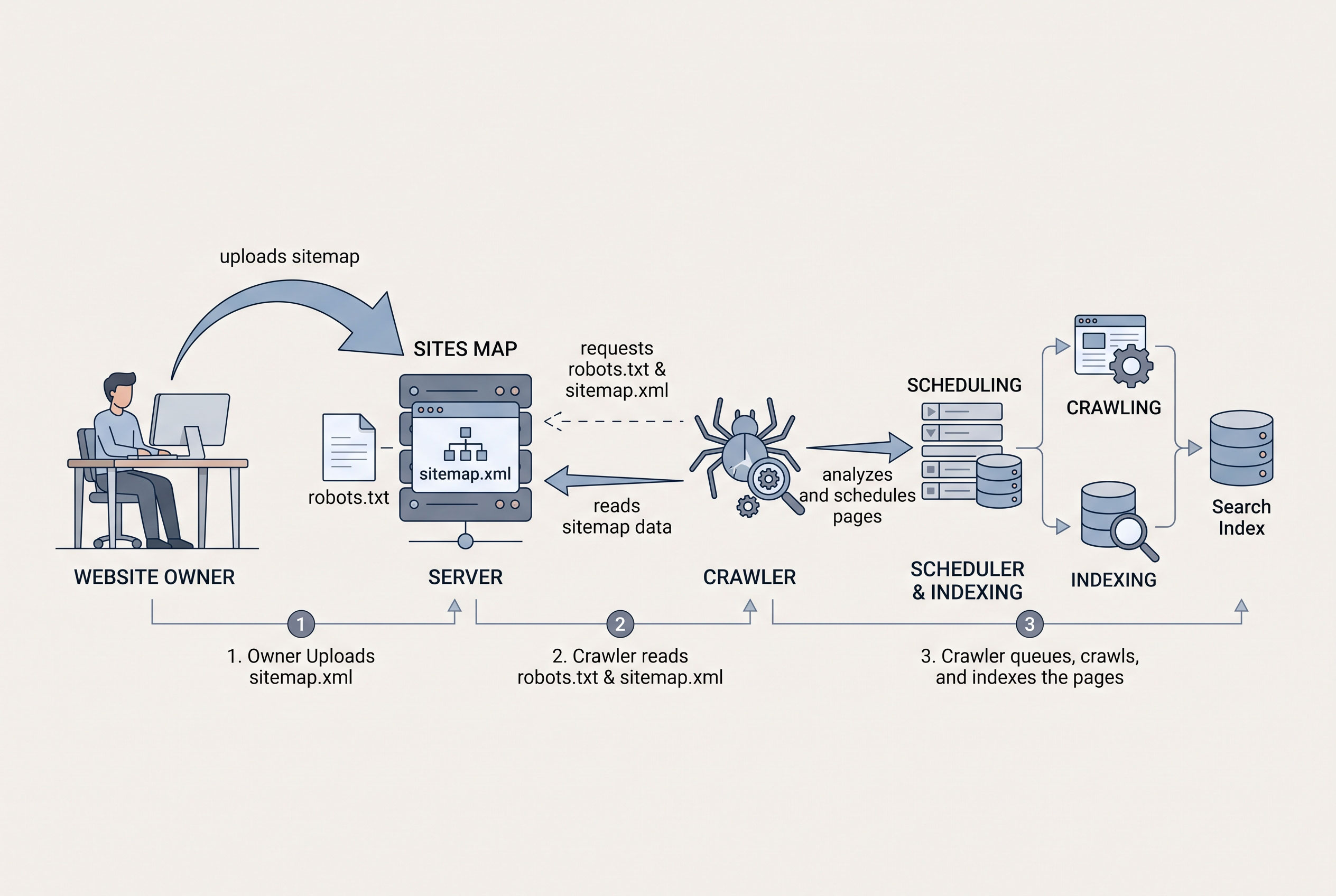
Site owners can make a sitemap known to search engines in
three common ways:
- Submitting
it through a search engine’s webmaster console, such as Google Search
Console or Bing Webmaster Tools.
- Adding
a Sitemap: line to the site’s robots.txt file.
- Placing
it at a predictable location, commonly the site root, although this alone
does not ensure discovery.
Once a search engine reads a sitemap, it may schedule URLs
for crawling. Inclusion is treated as a suggestion. Search engines decide
independently whether to crawl and index each URL, based on factors such as
content quality, duplication, and server accessibility.
Sitemap submission via an unauthenticated ping endpoint was
once common. Google announced that it deprecated its sitemap ping service in
2023, so submission through robots.txt or webmaster tools is now the standard
approach.
Sitemaps and robots.txt
The two files are often confused. robots.txt gives
crawlers instructions about which parts of a site they may or may not request.
A sitemap lists URLs that site owners would like discovered. The files can work
together, since robots.txt can point to the sitemap location.
Listing a URL in a sitemap does not override a robots.txt
disallow rule or a “noindex” directive. Sites that list blocked or noindexed
pages in a sitemap send conflicting signals, and search tools may flag these as
errors.
Common Misconceptions
- A
sitemap guarantees indexing. Search engines state that inclusion in a
sitemap does not ensure a page is crawled or indexed.
- A
sitemap improves rankings directly. Search engine documentation
describes sitemaps as a discovery aid, not a ranking factor.
- Every
site requires one. Small, well-linked sites are generally discovered
without a sitemap.
- HTML
and XML sitemaps are interchangeable. They differ in format and
audience.
Creation and Maintenance
Sitemaps are created manually, generated by content
management systems and plugins, or produced by scripts and crawling tools. Many
platforms generate and update them automatically as content changes.
Common maintenance practices include listing only canonical,
publicly accessible URLs that return a successful status, removing deleted or
redirected pages, and keeping <lastmod> values accurate. Search engine
webmaster tools report processing errors and the number of URLs discovered.
Current Status
The Sitemaps protocol remains widely supported by major
search engines and is generated by default on many content management systems.
Details of how individual search engines treat optional fields and extensions
may change, so current documentation from each search engine is the
authoritative source.